Debug (Problem Solving)
Known problem
-
My Node-red interface is poorly organized.
- The 1st potential problem is that your computer resolution is too different from the classical. To solve this probleme zoom out in your web-page (Internet browser). To do this go to the setting of your navigator and find zoom or use shortcut
ctrl + "-" or ctrl + "+". Until you get on the Home page, in beginner mode, the Shutdown section at the end of the first line (like picture bellow).
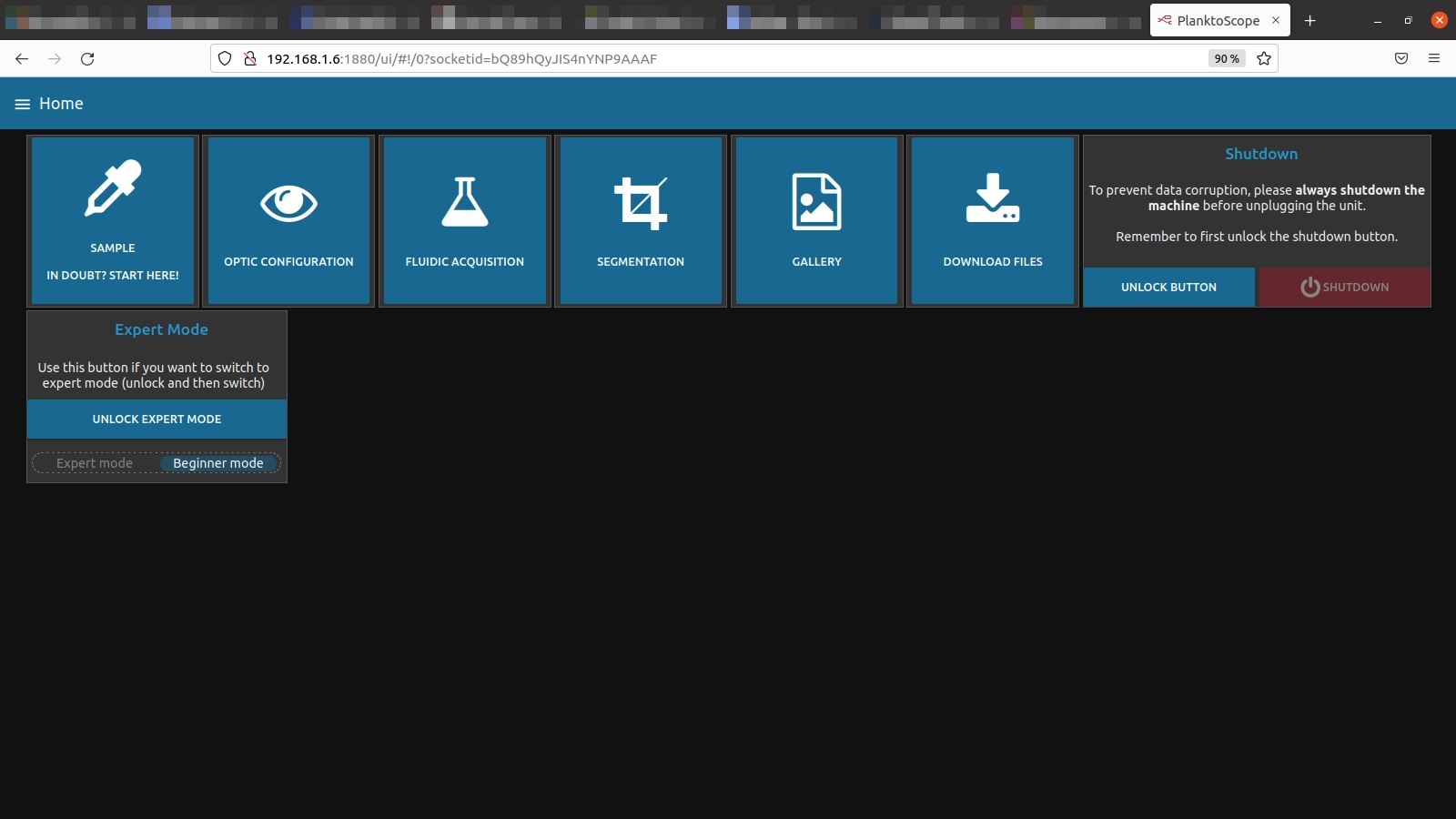
- The 2nd potential problem is that you think there are too many groups. It’s possible, it’s because there is a bug between beginner and expert mode. You need to go to page
Home, click on UNLOCK EXPERT MODE and then activate expert mode. And if you want to use the planktoscope in beginner mode, click on beginner mode.
- The 1st potential problem is that your computer resolution is too different from the classical. To solve this probleme zoom out in your web-page (Internet browser). To do this go to the setting of your navigator and find zoom or use shortcut
-
My motors don’t work when I ask them to.
-
If pump and focus motors don’t work. Check if they are supplied. To do this you need to see a green LED on the motor Hat.
-
If focus motor works but no the pump motor, you don’t get enough power from your power supply.
-
-
I don’t have GPS data in my Node-red interface.
-
If there is no led power on in GPS hat, that means the GPS is not alimented, try to push the wires’s the nat or check raspberry alimentation.
-
If the led is blinking, check the antenna connection. If it don’t work, it is possible that your Gps hat don’t see satelite (ex: to many cloud in the sky)
-
-
My PlanktoScope say
cut the power in 5swhen I didn’t turn it off or the stream of camera is not display.-
Somethink was wrong, go to page
Administrationand clik on restart RESTART PYTHON. -
If it don’t work, try to restart your machine, go to page
Administrationand clik on REBOOT. -
If it still doesn’t work after reboot, you need to restore the file hardware.json. For that go to ssh connection, then go in folder Planktoscope and write this line to reset the file.
git checkout -- hardware.json
-
-
I use the PlanktoScope with the Node-red interface but the PlanktoScope does nothing.
-
It’s possible, the node-red can be here like gosth but in background there is nothing. If you refresh the page and you see no connection, check that the PlanktoScope is turn on and check that your computer and the PlanktoScope are connected to a same network.
-
Check your wifi connection if you are in direct wifi or search ip of your PlanktoScope with angry scanner tuto.
-
-
I can’t find the wifi of my PlanktoScope in wifi setting of my computer.
-
If the name of planktoscope is not displayed on the fan hat and you see Cut the power in 5s you need to restart it.
-
After starting it, the wifi emmission can take few minutes. Please be patient.
-
Make sure that your PlanktoScope is not connected to an other wifi network.
-
I don’t find the PlanktoScope IP when I scan my wifi network
-
Network bug can appeared, and the PlanktoScope can get disconnected. It will try to re-connect and it does not happen, it will start difusion of her wifi. Please check available wifi connections and retry.
-
You entered the wrong password when you registered the network on the node red interface. No worries, the PlanktoScope will be difuse his wifi network. When it’s done, you can return to the page
Ẁifion node red interface and add the network with right password. The previons will be replace.
-
-
I start segmentation but it takes too much time and I want to stop it.
-
For the time being, there is no button to stop the segmentation.
-
The only way to do this without crushing everything is to reboot on page
Administration. This allows us to kill all the threads with a signal, this will stop properly.
-
-
The planktoScope make noise when it’s turn on.
- The fan can make noises, to resolve this problem, press shortly on this one to re-align it.
Other informations
-
Leds informations :
-
Led of motor hat
The motor hat led, is turn on green if the module is correctly supply.
-
Led of GPS hat
There are 2 status for this led, the first one, led is
blinking red, this status means that the hat is supply but it had not yet fix GPS satellite. The second one, led isfixed red, this status means that the hat found enough of satelite and usually it should send position and time to node-red. -
Leds of fan hat
Color Motion Meaning Green Fixed Soft is in progress of starting or if the led stayed green for too long, an error occured Blue Fixed Device is ready, properly started Blue Blinking Pump is running Red Fixed An error has occurred Yellow Blinking The system was interrupted Purple Fixed The segmenter is in progress Purple Blinking Optic motors (focus) are running White Ficed Immaging in progress
-
-
File organization
Go to the good section with this link File organization
-
Code organization
Go to the good section with this link Code organization